Best Scheduling Software for Freelancers Under $10 a Month
A freelancer can schedule clients for $0 a month: Cal.com's free individual plan gives one person unlimited event types, unlimited calendar connections and client payments through Stripe or PayPal, and Zcal's free plan adds unlimited booking links and meeting polls with payments too. If you'd rather pay once and stop thinking about it, TidyCal's Individual Lifetime plan is $29, one time.
Where these twelve differ is what the free plan runs out of. Five put no ceiling on bookings; Calendly, Doodle and YouCanBook.me stop you at one booking page or event type, and Appointlet and SimplyBook.me cap bookings each month. The other catch is in the Billing column: most of the upgrades that come in under $10 only do so when you pay for a year up front.
Our picks
- Best free plan with nothing metered: Cal.com. Unlimited event types and calendars for one user, 100+ integrations, and client payments on the free plan.
- Best for paying once: TidyCal. $29 one time buys the Individual Lifetime plan, and the free tier already takes paid bookings.
- Best for a freelancer with an assistant: Setmore. Free for up to 4 users with unlimited appointments, card payments, a branded booking page and a mobile app.
- Best for tutors and trainers with a space: Picktime. The free plan books rooms and equipment as resources across 2 locations, and Starter is $3.00 per user a month billed annually.
- Cheapest upgrade with no yearly commitment: YouCanBook.me. $9 a month billed monthly, which doubles the free plan's one calendar connection and one booking page.
At a glance
| Option | Free plan limit | What's free | Paid plan from | Billing | Takes payments | Best for |
|---|---|---|---|---|---|---|
| Unlimitedsource | 1 user, unlimited event types and calendars, email and SMS notifications, 100+ integrationssource | $12 per user/month (Teams)source | Per month, billed annuallysource | Free plansource | Scheduling as an individualsource | |
| Unlimitedsource | Unlimited links and calendar accounts, meeting polls, email reminders, group eventssource | $7 per user / month (Pro)source | Per month, billed annuallysource | Free plansource | Small teams and professionalssource | |
| Unlimitedsource | 3 users, 3 resources, 2 locations, 2 classes, unlimited appointmentssource | $3.00 per user, per month (Starter)source | Per month, billed annuallysource | Free plansource | Small businesses kick-starting their businesssource | |
| Unlimitedsource | Up to 4 users, unlimited appointments, payments, branded booking page and mobile appsource | $5 per user, per month (Pro)source | Per month, billed annuallysource | Free plansource | ||
| Unlimitedsource | Unlimited bookings and booking types, paid bookings, recurring and package bookingssource | $29 once for the Individual Lifetime plansource | One-time paymentsource | Free plansource | Solopreneurssource | |
| One booking page or event typesource | 1 calendar connection and 1 booking pagesource | $9 / month (Individual)source | Per month, billed monthlysource | Free plansource | Occasional online schedulingsource | |
| One booking page or event typesource | One group poll, one booking page, one 1:1 and basic sign-up sheetssource | USD 11 per seat / month (Pro)source | Per month, billed annuallysource | Paid plansource | Freelancers, consultants and solo prossource | |
| One booking page or event typesource | One event type, one calendar connection, one-on-one scheduling, customizable booking pagesource | $10 /seat/mo (Standard)source | Per month, billed annuallysource | Paid plansource | ||
| Online booking site and integrations, appointment reminders, unlimited staff calendarssource | $49/mo. per location (Square Plus)source | Per month, billed monthlysource | Free plansource | Solo professionals taking paymentssource | ||
| Capped bookings each monthsource | Up to 5 members, 25 meetings a month, 1 scheduling page, Zoom/Meet/Teams/Webexsource | $9 per member, per month (Premium)source | Per month, billed annuallysource | |||
| Capped bookings each monthsource | 50 bookings, 1 custom feature, 1 providersource | $11.9 per month (Basic)source | Per month, billed annuallysource | |||
| One user onlysource | One user, online meetings, notification emails and reminders, two-way calendar syncsource | Solo users who need the fundamentalssource |




Free scheduling plans that stop at one booking page
Cal.com, Zcal, Picktime, Setmore and TidyCal put no limit on bookings for a solo user. Calendly, Doodle and YouCanBook.me each allow one booking page or event type, which is where a freelancer with a free intro call and a paid session runs into trouble: on Calendly's free plan you pick one or upgrade. Doodle's free plan is the tightest, one of each thing, with ads.
Appointlet and SimplyBook.me meter volume instead, at 25 meetings and 50 bookings a month. Appointlet fits up to 5 members inside that cap, and SimplyBook.me gives one provider and one custom feature.
Under $10 a month, if you pay for the year
Picktime's Starter at $3.00, Setmore's Pro at $5, Zcal's Pro at $7 and Appointlet's Premium at $9 are all monthly prices billed annually, and Calendly's Standard sits exactly at $10 on the same terms. YouCanBook.me's $9 Individual plan is the only sub-$10 upgrade billed month to month. Doodle at USD 11, SimplyBook.me at $11.9 and Cal.com's $12 Teams plan are above the line, and Square Appointments jumps to $49 a month per location.
TidyCal sidesteps the question with its $29 one-time plan. For Zoho Bookings, the first paid price couldn't be read from its pricing page, so that row shows only what is free.
Taking a deposit or session fee
Seven tools let you take client payments on the free plan: Cal.com, Zcal, Picktime (PayPal, with Stripe and Square on Starter), Setmore, TidyCal, YouCanBook.me and Square Appointments. Calendly and Doodle make payments a paid feature, and on Doodle it only arrives on the Team tier. Square charges nothing for the scheduler and earns on card processing instead, 2.6% + 15¢ in person and 3.3% + 30¢ online, so those rates are the number to compare for that row.
The options in detail
Cal.com
Cal.com is the open-source answer to Calendly, and its individual plan is the most generous free tier in this table: one person gets unlimited event types, unlimited calendar connections, over a hundred app integrations and client payments through Stripe or PayPal, with nothing metered. That combination is unusual, since most competitors put payments behind a paywall. The catch for a freelancer is that the paid tier is aimed at teams rather than solo users, so there is no cheap middle step if you outgrow the free plan. It also assumes a little more comfort with configuration than the simpler booking-page tools here.
Zcal
Zcal makes the boldest free-plan claim here, saying almost everything it builds stays free forever, and the free feature list backs that up: unlimited booking links, unlimited connected calendars, meeting polls, group events, cover photos and welcome videos, plus Stripe payments. For a freelancer who wants a booking page that looks designed rather than generic, it is the strongest free option in this table. The paid Pro tier exists mainly for team features like round-robin routing. Its trade-off is a smaller company and a smaller integration catalogue than Calendly or Cal.com.
Picktime
Picktime is aimed at service businesses rather than meeting-schedulers, so its free plan is shaped differently from the rest: unlimited appointments, but also rooms and equipment as bookable resources, two locations, and two class-style group sessions. PayPal payments are included free. That makes it a good fit for a freelancer who runs sessions somewhere physical, like a tutor, trainer or therapist. The paid Starter tier is the cheapest upgrade in this table, and it is where Stripe and Square payments, SMS reminders and two-way calendar sync appear.
Setmore
Setmore gives away more of its product than almost anyone: the free plan covers up to four users, unlimited appointments, a branded booking page, a branded mobile app and card payments, which means a freelancer with an assistant or a couple of collaborators can run on it indefinitely. Upgrading is cheap and mostly buys two-way calendar sync, SMS reminders and a second automated reminder. The interface is built around a working calendar rather than a link you paste into email, so it suits appointment-based work more than back-and-forth meeting scheduling.
TidyCal
TidyCal is the one tool here that a freelancer can own outright rather than rent: a one-off payment through AppSumo buys the Individual plan for good, which is why it turns up constantly in solo-business recommendations. Even the free tier is unusually complete, with unlimited bookings and booking types plus paid bookings, so money can change hands without upgrading. The lifetime tier adds group bookings, package and recurring bookings, and automatic Zoom or Meet links. The monthly Pro subscription exists but is poor value next to the lifetime deal.
YouCanBook.me
YouCanBook.me sells itself on how far you can bend the booking page, and unusually it hands most of that customisation to free users: your own logo and wording, custom form questions, customised confirmation emails and SMS, and Stripe payments including Apple Pay and Google Pay. The free plan is capped at one calendar and one booking page, which is the pinch point for anyone offering more than a single service. The paid Individual tier doubles both and is billed monthly, so it is one of the few here you can pay for without committing to a year.
Doodle
Doodle started as a group poll for finding a time everyone can make, and that is still what it does better than anything else here: if your work involves pinning down a date with several people at once, the poll and sign-up sheet are the reason to choose it. Its Pro tier is explicitly sold to freelancers and solo professionals. The free plan is the tightest in this table, allowing one of each thing, and it shows ads. Client payments only arrive on the Team tier, which is a real gap for anyone taking deposits.
Calendly
Calendly is the default that clients are most likely to have used before, and its free plan is genuinely free forever rather than a trial: unlimited one-on-one meetings, a customisable booking page and a browser extension. The limit that bites is one event type and one connected calendar, so a freelancer offering a free intro call and a paid session has to pick one or upgrade. Payments through Stripe and PayPal are a paid feature. Its Standard tier sits right at ten dollars a month, at the top of what this question allows.
Square Appointments
Square Appointments is free for a single person and is really a payments business with a scheduler attached, so it is the obvious pick for a freelancer whose bookings end in a transaction: a stylist, tattooist, groomer or trainer. Booking site, reminders and staff calendars cost nothing; Square instead earns on card processing, and those percentages are the number to compare rather than a subscription price. The paid tiers add no-show fees, cancellation policies and waitlists, but they jump to a price well outside this list. It is heavier to set up than a simple booking link.
Appointlet
Appointlet is a straightforward booking-link tool whose free plan is metered by volume rather than features: twenty-five meetings a month, one scheduling page, and video links through Zoom, Meet, Teams or Webex. For a freelancer who takes a handful of calls a week that ceiling is comfortable, and the free plan allows up to five members, which is more headroom than most. Once you pass twenty-five meetings there is no middle option, so the jump to the paid tier is the whole decision. It is a plainer product than Calendly, with less polish on the booking page.
SimplyBook.me
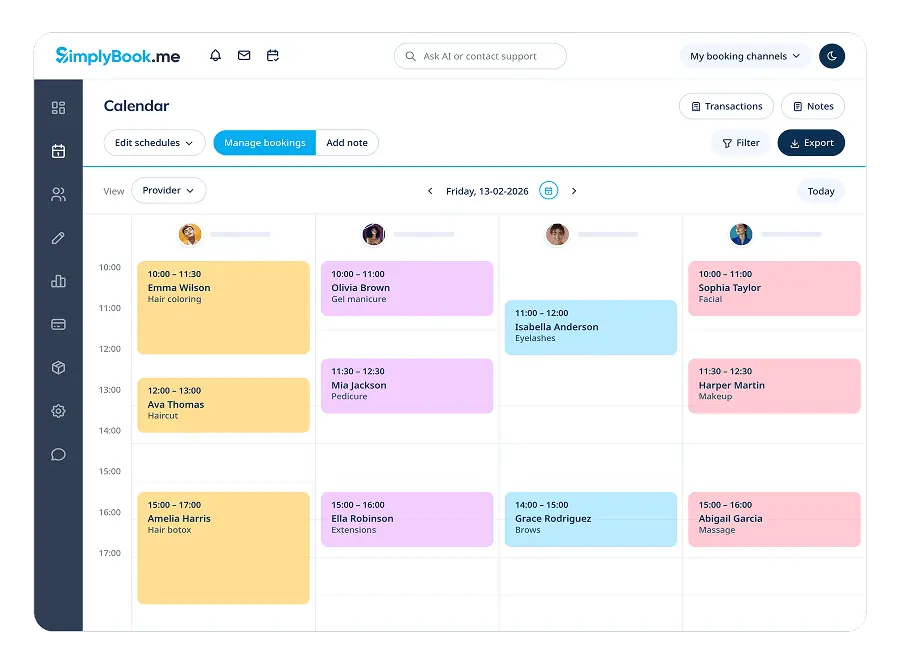
SimplyBook.me is built for service businesses that need a booking website rather than a link, and it sells its extras as individually switchable custom features, which is why the free plan is described as fifty bookings, one provider and one custom feature. That shape suits a freelancer who wants a proper booking site and can live with a monthly cap. The cheapest paid tier is the most expensive first upgrade in this table and sits above ten dollars a month. Its strength is breadth of add-ons: intake forms, memberships, coupons and deposits are all available.
Zoho Bookings
Zoho Bookings has a forever-free plan written specifically for one person, covering online meetings, notification emails and reminders, and two-way sync with Zoho, Google and Microsoft 365 calendars. Its real argument is the rest of Zoho: a freelancer already using Zoho Mail, CRM or Invoice gets bookings that flow into those tools without extra wiring. Against that, the pricing page renders its plan prices in a way that cannot be quoted, so the cost of the first paid tier is not recorded here. The product is also busier to configure than a single-purpose booking link.
How we researched this
A tool made the list if one person can run it for under $10 a month, free or on a cheap tier, so Acuity Scheduling ($16 a month) and SavvyCal ($12 a month, no free plan) were left out. Google Calendar appointment schedules and Microsoft Bookings come bundled with office suites and have no standalone price to show, and shift-scheduling tools such as Homebase and Sling were left out because they roster employees. Koalendar has a strong free plan, but its pricing page showed two different Pro prices at once, so we couldn't say which one you'd see. Calendly and Square stay in despite upgrades at or over $10 because their free plans cost nothing for one person, and Calendly is the name most clients already know.
Paid prices are worded as each vendor prints them. YouCanBook.me's page defaults to a 2-year price of $7.20 a month, and we recorded its plain monthly figure instead, so flip the billing toggle on a vendor's page to match before you compare.